Post Office Tracking – USPS Statuses and Tracking Guide
United States Postal Service tracking enables senders and recipients to monitor packages throughout the delivery network using a unique 20-22 digit identifier. Entering this number into the official USPS tracking portal reveals scan history, location updates, and delivery confirmation. The system captures barcode scans at each facility from initial acceptance to final delivery.
Domestic tracking numbers typically begin with “9”—often 9400 for standard parcels or 9205 for Priority Mail—while international shipments follow formats such as CPxxxxxxxxxUS. These codes appear on Post Office receipts, confirmation emails, and the bottom peel-off portion of shipping labels. Once active, the tracking record displays timestamps for every touchpoint across the USPS logistics infrastructure.
Multiple access methods exist for retrieving this data. Users can monitor progress through the primary USPS website, dedicated mobile applications, text messaging services, or automated digital dashboards linked to residential addresses. Each channel provides visibility into the package’s current status within the postal network.
How Do I Track My USPS Package?
Locating and monitoring a shipment requires the tracking number assigned at the time of label creation. The official USPS tracking tool accepts up to 35 numbers simultaneously, displaying full scan histories including dates, times, and facility locations.
Enter numbers at tools.usps.com for comprehensive scan history and delivery confirmation.
USPS Mobile App for iOS and Android supports manual entry or barcode scanning with push notification alerts.
Send tracking numbers to 28777 (2USPS) for immediate status replies; text “HELP” for command options.
Free dashboard service linking packages to your address with daily email previews.
Understanding the core mechanics of post office tracking helps users set realistic expectations for update frequency and data accuracy. The following insights clarify common misconceptions about the system:
- Domestic identifiers typically start with “9”, while international formats use two letters, nine digits, and “US”
- USPS.com accepts up to 35 tracking numbers for simultaneous monitoring
- Lost tracking numbers cannot be recovered through any USPS system
- Tracking activation occurs upon label creation, not necessarily when the physical item enters the mailstream
- Mobile applications enable barcode scanning to eliminate manual entry errors
- Informed Delivery requires 2-5 business days for activation after identity verification
- Text messaging provides status updates without requiring internet connectivity
| Fact | Details |
|---|---|
| Tracking Number Location | Post Office receipt, confirmation email, label peel-off portion, or USPS.com Click-N-Ship history |
| Domestic Format | 20-22 digits; standard parcels often 9400, Priority Mail typically 9205 |
| International Format | Two letters, nine digits, “US” (e.g., CP 000 000 000 US) |
| Update Frequency | Every few hours to 24 hours depending on facility processing |
| Simultaneous Tracking Limit | 35 numbers maximum on USPS.com interface |
| Tracking Initiation | Activates upon label creation in USPS systems |
| Number Recovery | Impossible if original documentation is lost |
| Mobile Capabilities | Barcode scanning, push notifications for status changes |
| Text Service Number | 28777 (2USPS) |
| Informed Delivery Activation | 2-5 business days after address and ID verification |
Finding Your Tracking Number
The identifier appears on multiple documents depending on how the shipment originated. For retail purchases, the Post Office shipping receipt contains the number at the bottom. Online retailers typically include the code within confirmation emails. For self-created labels, the bottom peel-off portion of the adhesive label displays the tracking information. Users who ship through USPS.com can locate historical numbers within their account under “Track and Manage” or Click-N-Ship history.
International Tracking Considerations
Cross-border shipments require the same tracking portal but may display different update patterns. After a package clears U.S. Customs, tracking visibility may pause for one to four weeks while the item transfers to foreign postal networks. During these gaps, checking the sender’s national postal service system often provides more comprehensive location data than USPS systems alone.
What Do USPS Tracking Statuses Mean?
USPS updates tracking records when barcode scanners register items at facilities, during loading for delivery, or upon completion of delivery. Each status message carries specific operational meaning regarding the package’s location and next steps.
Common Status Definitions
| Status | Meaning | Recommended Action |
|---|---|---|
| In Transit to Next Facility | En route to another sorting or destination facility | Monitor for subsequent scans |
| Arrived at/Departed USPS Facility | Reached or left a specific processing location | No immediate action required |
| Arrival at Unit | At the destination post office; scheduled for next delivery cycle | Prepare for imminent delivery |
| Out for Delivery | Loaded onto carrier vehicle for delivery that day | Ensure availability or leave delivery instructions |
| Delivered | Scanned as delivered to mailbox, porch, or pickup point | Check all delivery locations and with neighbors |
| Available for Pickup | Delivery attempt failed; item held at post office for 15 days | Bring identification and tracking number to facility |
| Vacant/Unclaimed | Location determined empty or unclaimed | Contact sender or local post office immediately |
| Alert | Delay due to weather, natural disaster, or network disruption | Check USPS service alerts for regional updates |
The “Out for Delivery” Status
This designation indicates the parcel rests on the carrier’s delivery vehicle for that operational day. However, the tracking record often receives no intermediate updates between “Out for Delivery” and “Delivered.” The system typically updates only when the carrier completes the route and scans the final delivery confirmation.
Packages marked “Out for Delivery” frequently display no location updates throughout the delivery route. The status indicates the item is on the vehicle but does not provide real-time GPS tracking of the carrier’s position. Updates typically occur only after the delivery event is confirmed at the destination.
Why Is My USPS Tracking Not Updating?
Scan delays occur when packages move through the network without barcode registration at intermediate points. This gap between physical movement and digital updates creates the appearance of stalled progress while the item continues transit.
Pre-Shipment and Processing Delays
The “Pre-Shipment” status indicates USPS has received electronic notification of the label creation but has not yet physically received the item. This status does not mean the package is stationary; it merely reflects that no acceptance scan has occurred. Upcoming 2026 processing modifications may extend this initial gap to 72 hours between label creation and the first physical scan.
Address and Routing Complications
Incorrect ZIP codes, unreadable labels, or necessary rerouting cause packages to miss scheduled scan points. Weather events and network volume also create backlogs that delay scan updates while items queue for processing.
Network changes planned for 2026 introduce potential 72-hour delays between label creation and first physical scan. This operational shift affects initial visibility but does not indicate the package has stopped moving through the logistics pipeline.
When to File a Missing Mail Search
If tracking shows no updates for seven or more business days past the expected delivery date, filing a Missing Mail Search initiates a formal investigation. The request requires sender and recipient addresses, shipping date, and package description. USPS searches facilities and vehicles network-wide to locate the item.
How Long Does USPS Tracking Take?
Tracking availability extends throughout the entire shipping duration, with update frequency varying by service level and distance. USPS Ground shipping typically delivers within 2-5 days, while international shipments may display tracking gaps of one to four weeks after clearing customs.
After packages exit U.S. Customs, tracking updates may cease for one to four weeks while foreign postal networks handle the item. For complete visibility during these intervals, cross-reference the tracking number with the sender’s national postal service system.
USPS Tracking Plus extends access to tracking history beyond standard retention periods for domestic shipments. This service maintains records for reference long after standard tracking archives expire.
Selecting the right mattress can be as important as monitoring its delivery. Consider options like a Mattress in a Box for convenient shipping and tracking similar to standard postal parcels.
What Happens During Each Stage of USPS Tracking?
The journey from sender to recipient follows a structured three-leg process: collection to origin facility, origin processing to destination processing, and destination facility to delivery address. Each leg generates specific scan events recorded in the tracking history.
- Label Created: Shipper generates shipping label; USPS receives electronic notification but has not yet received the physical item.
- Accepted at Post Office: USPS takes physical possession and performs initial acceptance scan.
- In Transit to Next Facility: Package moves between processing centers via ground or air transportation.
- Arrived at/Departed USPS Facility: Item scans at intermediate sorting facilities during cross-country transit.
- Arrival at Unit: Package reaches the destination delivery office responsible for the recipient’s address.
- Out for Delivery: Carrier loads the item onto the delivery vehicle for the current operational day.
- Delivered: Carrier scans the package at the delivery location, completing the tracking record.
Definitive Facts vs. Common Uncertainties
| Established Information | Information That Remains Uncertain |
|---|---|
| USPS captures scans at facility entry and exit points using barcode technology | Exact delivery times beyond the “Out for Delivery” morning scan |
| Lost tracking numbers cannot be recovered through any USPS system | Specific causes of individual scan delays without contacting customer service |
| International tracking pauses for 1-4 weeks after U.S. Customs clearance | Final delivery confirmation timing within foreign postal networks |
| Three-leg journey structure governs all domestic parcel movements | Precise weather-related delay durations before they occur |
| Missing Mail Searches require 7+ business days of no updates | Location of packages during extended “In Transit” gaps without scans |
The Infrastructure Behind Post Office Tracking
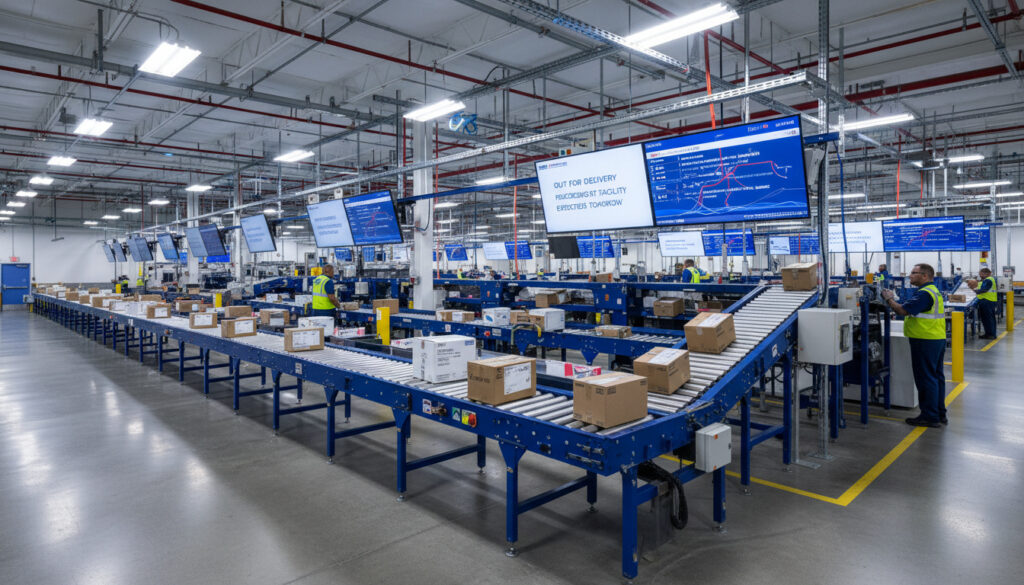
USPS tracking relies on automated barcode scanning systems installed at every processing facility nationwide. Each package receives multiple scans: upon acceptance, during facility transfers, at arrival hubs, and upon final delivery. This infrastructure processes millions of items daily, creating the digital trail visible through tracking portals.
The network operates through three distinct phases. First, collection facilities aggregate mail from post offices and retail locations. Second, centralized processing centers sort items by destination region using automated machinery. Third, destination delivery units dispatch carriers to addresses. Each phase transition generates the status updates visible to users.
When evaluating e-commerce platforms that rely on these postal services, consumers should verify legitimacy before purchasing. Research whether Is Temu Legit to understand how tracking and delivery compare to standard USPS services.
Official USPS Documentation
USPS maintains comprehensive support documentation regarding tracking procedures and troubleshooting. Official guidance emphasizes that tracking numbers must be retained from original documentation, as recovery is impossible once lost.
“Lost tracking numbers cannot be recovered. Check your Post Office shipping receipt, confirmation email from USPS.com, or the bottom peel-off portion of your USPS label.”
— USPS FAQ, Tracking Number Recovery Policy
“If your mailpiece has not arrived by the expected delivery date, you can take several steps. First, check the current status of your item using USPS Tracking.”
— USPS FAQ, Missing Package Procedures
Key Takeaways for Package Monitoring
Effective use of post office tracking requires retaining the original tracking number, understanding that “Pre-Shipment” indicates electronic notification rather than physical possession, and recognizing that “Out for Delivery” status may not update again until final delivery confirmation. For packages delayed beyond seven business days, initiating a Missing Mail Search triggers a formal network-wide investigation.
Frequently Asked Questions
Can I track USPS mail without a tracking number?
No. USPS requires the tracking number to locate specific items within the network. Lost numbers cannot be recovered through any system; users must locate the original receipt, email confirmation, or label documentation.
What if I lost my USPS tracking number?
Check the Post Office shipping receipt, USPS.com confirmation email, or the bottom peel-off portion of the shipping label. If none of these documents are available, tracking the specific package is impossible.
Why is my USPS package delayed with no tracking update?
Delays occur due to incorrect addresses, weather events, network volume, or rerouting. Packages may travel without intermediate scans, creating visibility gaps while the item continues moving through facilities.
USPS tracking says delivered, but I have no package. What now?
Check all possible delivery locations including porches, side doors, and mailboxes. Ask neighbors if they accepted the item. If still missing, contact your local post office with the tracking number and delivery address.
Which is the best USPS tracking app?
The official USPS Mobile App provides barcode scanning, push notifications, and direct access to tracking data. Third-party apps may offer additional features but pull data from the same USPS systems.
How do I track an international USPS package?
Enter the international format number (e.g., CPxxxxxxxxxUS) at tools.usps.com. After U.S. Customs, check the sender’s national postal service for updates, as USPS visibility may pause for 1-4 weeks.
What does “Alert” status mean on USPS tracking?
The Alert status indicates delays caused by severe weather, natural disasters, or network disruptions affecting specific regions. Check USPS service alerts for details about your delivery area.
How often does USPS tracking update?
Updates occur every few hours to 24 hours when packages scan at facilities. Items moving long distances may show no updates for 24 hours or more between origin and destination facilities.
More related posts
 Millie Bobby Brown Baby: Adoption Announcement & Details
 Wallabies vs Springboks 2026: Schedule, Scores, and How to Watch
 Nico Hulkenberg: F1 Record, Net Worth, Salary & Verstappen
 McKenna Grace: Biography, Age, Net Worth, Movies
 Jackson Pollock: Life, Death, Art Style & Most Famous Paintings
 60 Euro to AUD – Current Rate and Conversion Guide
 Central Coast Mariners FC: APL Takeover After Titles
 Lady Colin Campbell: Biography, Gender, Net Worth & Royal Ties